
Put the conversation in the workflow.
Use role criteria and candidate context to shape a live AI voice interview with answer-led follow-ups.
Explore Two-way AI voice interviews
Choose Tarkflo to connect a branded application experience with role-specific screening, two-way voice interviews and candidate evidence. The first round and the next hiring steps work around the same job and application.
Official product sources reviewed .

Why choose Tarkflo
Use role criteria and candidate context to shape a live AI voice interview with answer-led follow-ups.
Explore Two-way AI voice interviewsInspect matched requirements, supporting reasons and confidence context alongside the FitScore.
Explore FitScore CV screeningBuild and publish a careers experience that brings eligible open roles into the hiring journey.
Explore Branded careers pagesSee Tarkflo in action
Build a branded careers page and review draft changes before publishing them with your eligible open roles.
Use job criteria to review CV fit, then collect structured screening responses and run the configured voice-interview round.
Review candidate evidence and continue into the next configured stage using the same hiring record.
Bring your corporate or staffing hiring process to both demos. Include the public application experience, recruiter permissions and the records that must move after a hiring decision.
Native Tarkflo UI · Fictional sample data
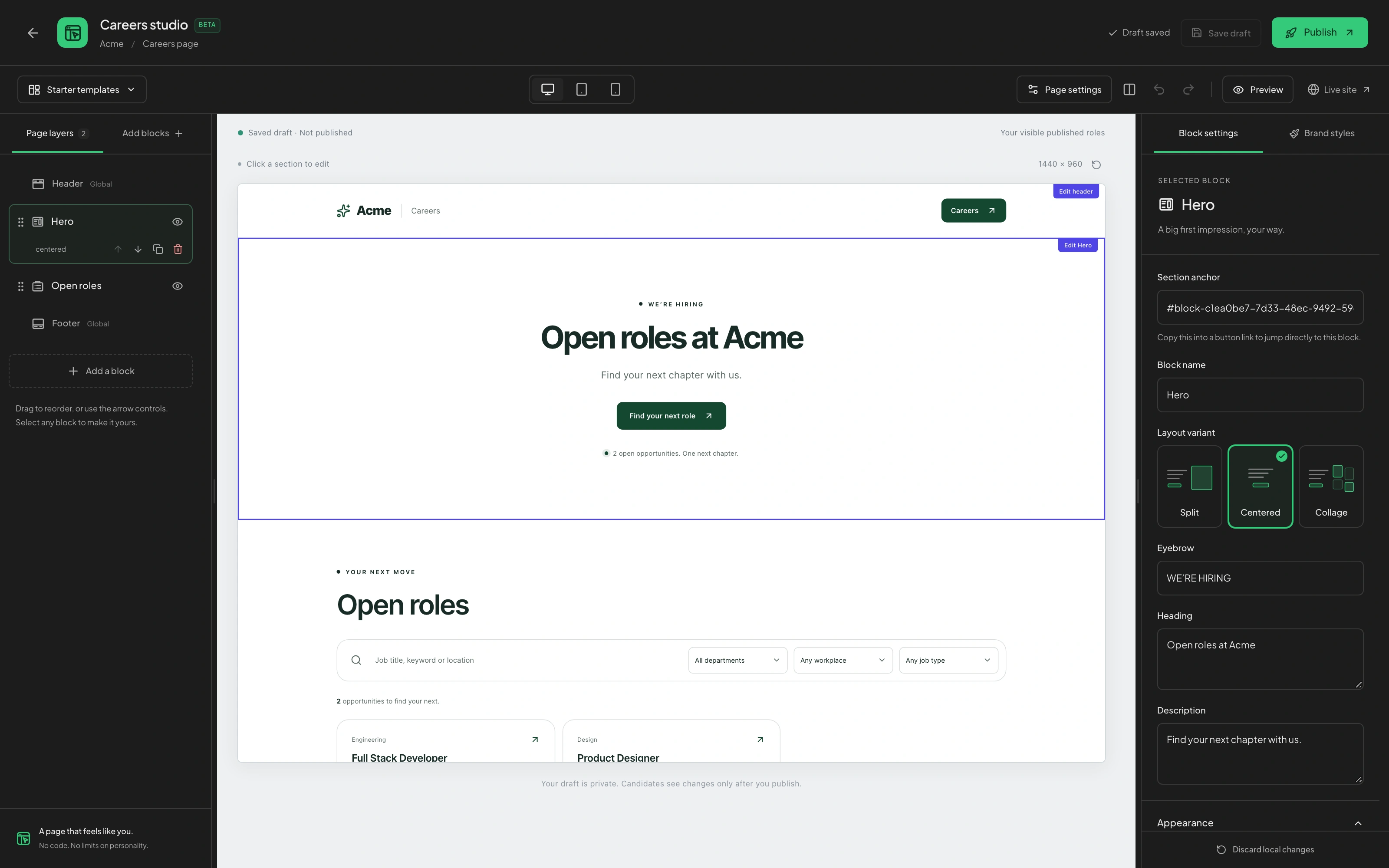
The careers editor uses fictional Acme content to show page layers, the preview and block settings. Changes can remain a draft until your team publishes the reviewed page.
Explore this Tarkflo workflowMake AI voice interviews part of the candidate journey.
Compare Tarkflo and Zoho Recruit across AI screening, interview evidence, ATS workflows and the transfer into employee onboarding.
Zoho Recruit’s configurable pipelines and the Zoho People handoff are relevant when your team is evaluating recruitment within an existing Zoho environment.
Zoho Recruit combines sourcing, configurable pipelines, workflow automation, scheduling and video interviews in an applicant tracking system.
Zoho Recruit features (opens in a new tab)Choose Tarkflo to bring role-based screening and a two-way AI voice first interview into the same hiring process. Connect your branded application experience, candidate evidence and subsequent hiring stages.
See the hiring workflowOn smaller screens, scroll the table to compare both products.
| What to compare | Tarkflo Hire | Zoho Recruit |
|---|---|---|
| Screening assistance | Review CV fit against the role and run structured screening plus two-way AI voice interviews. Candidate context and the job’s criteria shape the interview conversation. Two-way AI voice interviews | Zia supports candidate matching, assessment generation, screening chatbots and application summaries. Interview Insights transcribes and summarizes video interviews. Official source: Zoho Recruit AI recruitment (opens in a new tab) |
| Pipeline operations | Connect a branded careers page with the job’s candidate workflow, then manage completed rounds, evidence and subsequent hiring stages in the candidate record. Branded careers pages | The ATS feature set covers candidate sourcing, configurable hiring stages, automation, scheduling, collaboration and built-in video interviews. Official source: Zoho Recruit features (opens in a new tab) |
| Employee handoff | Connect the accepted offer with joining preparation, document statuses and separate team and candidate checklists in the hiring-to-joining process. Candidate onboarding | The Zoho People integration transfers candidate and offer information into employee and onboarding workflows, including status-based triggers. Official source: Zoho People and Recruit integration (opens in a new tab) |
| Edition and team access | Match the published Tarkflo plan to your recruiter team, enabled modules, AI usage and interview-minute requirements for the workflow you intend to run. Current Tarkflo pricing | Zoho Recruit distinguishes corporate-HR and staffing editions, recruiter licences and limited-access reviewer roles in its pricing configuration. Official source: Zoho Recruit edition and licence configuration (opens in a new tab) |
Confirm the applicable corporate-HR or staffing edition, recruiter licences, reviewer access and required add-ons. Match those requirements to the team, modules and usage in your Tarkflo plan.
Careers Studio lets the team build a branded careers page, save draft changes and publish reviewed content alongside open roles. Applications then enter the configured hiring process.
Tarkflo provides API operations for candidate submission and supported interview workflows, plus signed hiring-event webhooks. Define the required data and events when planning your integration.
Published by Tarkflo. We reviewed the linked official vendor pages on and checked Tarkflo descriptions against implemented product behavior. Native product examples use fictional sample data; generated illustrations are decorative. This source-based guide is not a head-to-head benchmark or an independent review. Use the demos to confirm the package, pricing, integrations and setup that fit your team.
Company and product names belong to their respective owners. These comparisons do not imply affiliation or endorsement.
Put role-specific interviews and joining readiness in focus.
Read the comparisonKeep voice interviews, evidence and offers connected.
Read the comparisonRun AI interviews and the next hiring steps together.
Read the comparisonAsk the pipeline. Open the evidence. Move hiring forward.
Read the comparisonYour role. Your criteria. Your decision.
Bring the process you want to compare. We’ll walk through screening, interviews, evidence and the next steps with your team.
A practical walkthrough built around your team.